MP3 vs WAV vs FLAC vs AAC: Complete Audio Format Comparison Guide 2025
MP3 vs WAV vs FLAC vs AAC: Which Audio Format Should You Use?
The best audio format depends on your use case: Use FLAC for archiving music (lossless quality, half the size of WAV), MP3 at 256-320kbps for sharing and portable devices (universal compatibility), WAV for recording and editing (uncompressed, no quality loss during editing), and AAC for Apple devices and streaming (better quality than MP3 at same file size).
Key Takeaway: Never save irreplaceable audio in lossy formats only. Keep lossless masters (FLAC or WAV) and create lossy versions (MP3, AAC) as needed for specific purposes.
The $300 Mistake That Taught Me About Audio Formats
Five years ago, I spent a month carefully digitizing my vinyl collection. Two hundred albums, thousands of hours of music. I researched turntables, preamps, and recording software. I did everything right.
Except for one thing: I saved everything as 128kbps MP3 files.
Two years later, I upgraded to decent headphones. Suddenly, I could hear every shortcut I'd taken. The cymbals sounded like sizzling bacon. The bass was muddy. Vocals had weird artifacts during sustained notes.
I'd destroyed my entire collection by choosing the wrong format. The vinyl was fine - the recordings were garbage. I either had to accept mediocre sound quality or spend another month re-digitizing everything.
That expensive lesson taught me that audio formats matter. A lot. The format you choose affects sound quality, file size, compatibility, and whether you can improve things later.
Here's everything I learned about audio formats, including which mistakes to avoid and what I'd do differently today.
What Is the Difference Between Lossy and Lossless Audio?
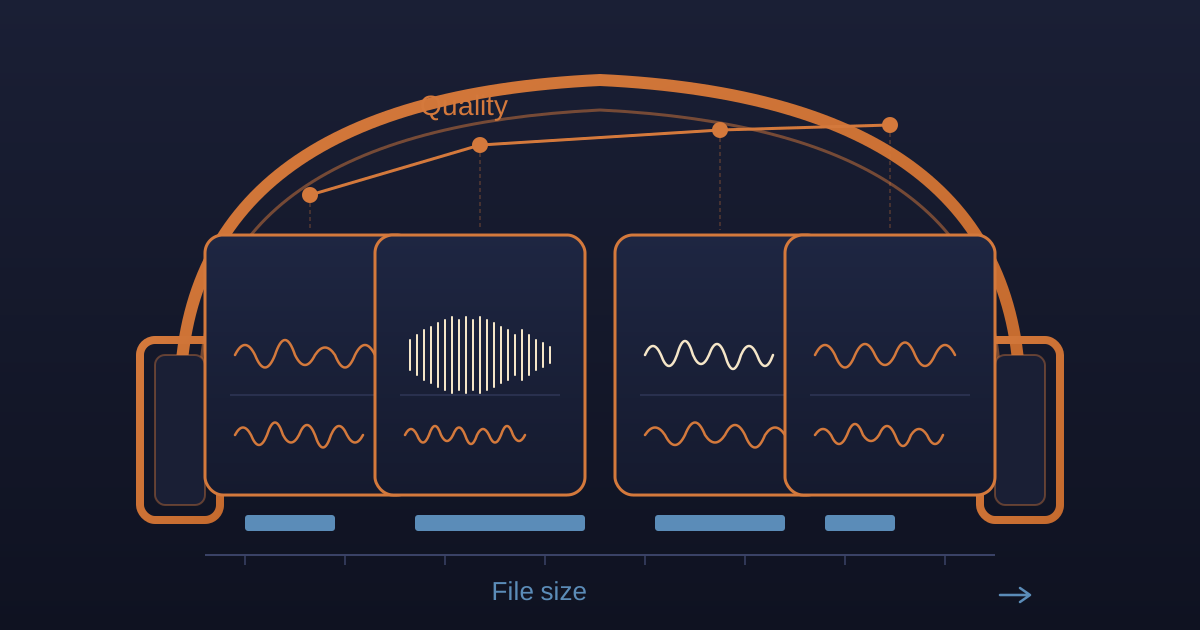
Lossy audio formats (MP3, AAC, OGG) permanently remove audio data to achieve smaller file sizes. Lossless formats (FLAC, WAV, ALAC) preserve every bit of the original audio.
For the first few years, I thought all digital audio was basically the same. An audio file was an audio file. Wrong.
Lossy Compression: Trading Quality for Size
When you create an MP3, AAC, or OGG file, the compression algorithm analyzes the audio and throws away parts it thinks you won't notice.
High frequencies that most people can't hear? Gone.
Quiet sounds that happen at the same time as loud sounds? Gone.
Subtle details in complex music? Gone.
The result is a much smaller file, but you've permanently lost information. You can never get it back. Converting that MP3 back to WAV doesn't restore the lost audio - it just gives you a larger file with the same reduced quality.
This is why my vinyl digitization was a disaster. I took perfect vinyl audio and deliberately destroyed parts of it to save disk space. Then I got rid of the digital source and kept only the degraded versions.
Lossless Compression: Perfect Quality, Smaller Than WAV
Formats like FLAC and ALAC use compression that's completely reversible. They analyze the audio, find patterns, and represent it more efficiently - but without throwing anything away.
Think of it like zipping a text file. When you unzip it, you get exactly the original file back. Same concept with lossless audio.
FLAC files are typically 40-60% the size of WAV files while maintaining perfect, bit-perfect audio quality. Decompress a FLAC, and it's mathematically identical to the original WAV.
This is what I should have used for my vinyl. Lossless preservation of the original audio, with the option to create lossy versions later for portable devices.
MP3 Format: When Should You Use It?
MP3 is best for sharing audio, portable devices, and maximum compatibility. It's the most recognized audio format and plays on virtually every device made in the last 25 years. However, it's also probably the most misunderstood and misused format.
When MP3 Actually Makes Sense
I used to use MP3 for everything. Big mistake. Now I use MP3 only when it actually makes sense:
1. Portable music players with limited storage. My old 32GB iPod held about 8,000 songs as 192kbps MP3. As FLAC, maybe 1,500 songs. The compromise made sense for a device I used while jogging.
2. Podcast distribution. Listeners don't need lossless quality for spoken word. MP3 at 96-128kbps is perfectly fine and downloads quickly.
3. Sharing music with people who don't care about audio quality. When my friend asks for a mix, MP3 at 256kbps is more than good enough.
4. Streaming over limited bandwidth. Sending audio files for client review over slow connections, MP3 is practical.
What MP3 Bitrate Should I Use?
I've digitized audio at every MP3 bitrate. Here's what actually happens at each quality level:
128kbps: This is what I used for my vinyl. Big mistake. You can hear compression artifacts clearly on good equipment. Acceptable only for low-quality sources or background music.
192kbps: Noticeable improvement. Most casual listeners won't complain on average equipment. I use this for podcasts with music.
256kbps: The sweet spot for most people. Noticeably better than 192kbps, and the file size is still reasonable. This is what I use when MP3 is necessary.
320kbps: The maximum MP3 quality. On most equipment, most people can't reliably distinguish this from lossless. If I'm using MP3, I usually use this.
Variable Bitrate (VBR): This is smarter. The encoder uses high bitrates for complex passages and lower bitrates for simple ones. VBR at quality level 2 (roughly 190kbps average) often beats 256kbps constant bitrate.
My Current MP3 Rule
I never use MP3 as a master or archival format. Period.
I keep masters in FLAC or WAV. When I need MP3 (for portable devices or sharing), I create it from the lossless source. This way, I can always create better versions later without going back to the original source.
WAV Format: Is It Worth the File Size?
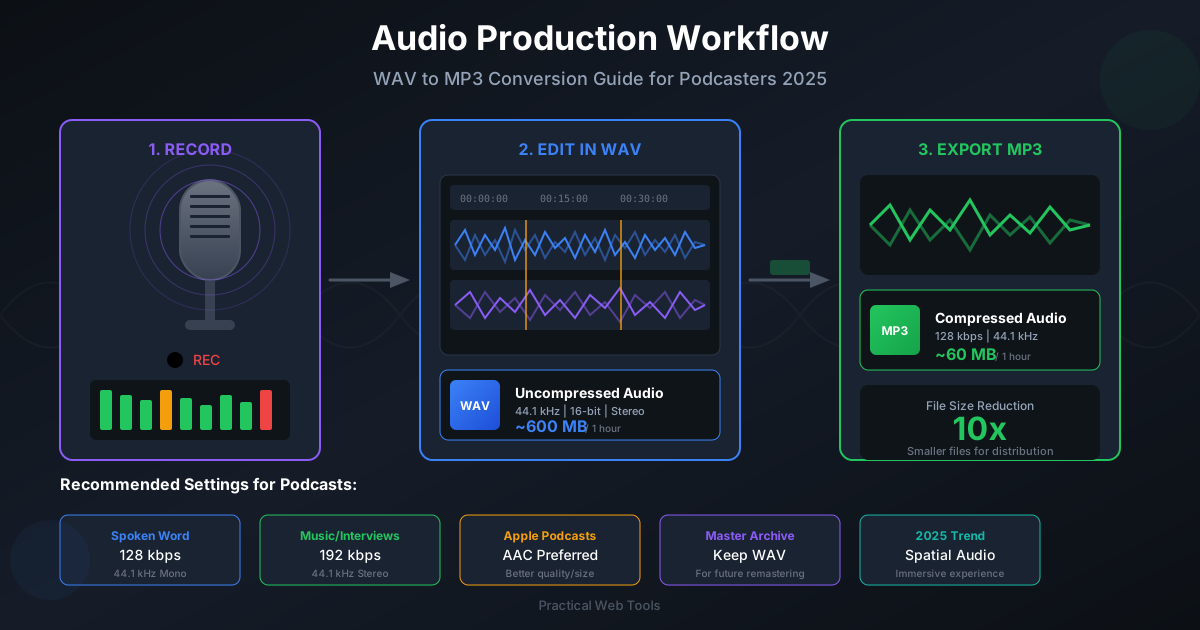
WAV is uncompressed audio that preserves perfect quality but creates very large files. Every sample, every bit, stored without any processing or reduction. A 3-minute song is approximately 30MB as WAV compared to 5MB as MP3.
Why Professional Studios Use WAV
When I worked on a podcast production project, the audio engineer insisted on WAV for everything. At first, this seemed wasteful - the file sizes were enormous.
Then I understood why:
1. Zero quality loss through editing. When you edit an MP3, re-export it, then edit again, quality degrades each time. WAV doesn't do this. Edit it 50 times, quality remains perfect.
2. Universal compatibility. Every audio program ever made can handle WAV. No codec issues, no compatibility problems.
3. No processing overhead. Your computer doesn't need to decompress anything during playback or editing. This matters when you're working with dozens of tracks simultaneously.
4. Maximum fidelity for mastering. When creating the final version of an album, you want absolute certainty that no compression artifacts exist. WAV provides this.
Why I Don't Use WAV for Personal Music
Despite its advantages, WAV has major problems for personal use:
The file sizes are absurd. A 3-minute song at CD quality (44.1kHz, 16-bit stereo) is about 30MB as WAV. My 200-album vinyl collection would be over 600GB. I have a 1TB drive, but dedicating 60% of it to music seemed excessive.
Limited metadata support. WAV files can't reliably store artist, album, and track information. You can hack it with third-party tools, but it's messy and unreliable.
Waste of space. FLAC gives you literally the same audio quality at 40-60% of the file size. Why wouldn't you use that?
My Current WAV Rule
I use WAV only for active production work:
- Recording and editing
- Active mixing projects
- Files I'll be importing and exporting multiple times
Once a project is done, I convert to FLAC for archival. Same quality, fraction of the size.
FLAC vs MP3: Which Is Better for Music?
FLAC is better for archiving and preserving music quality, while MP3 is better for sharing and portable playback. FLAC provides lossless quality at about 50% of WAV file size, making it ideal for anything you want to keep forever.
Why FLAC Changed Everything for Me
After my vinyl disaster, I re-digitized everything as FLAC. The difference:
Perfect audio quality. Bit-for-bit identical to the original WAV. When I compare waveforms, they're mathematically identical.
Reasonable file sizes. My 200-album collection went from a projected 600GB (as WAV) to about 240GB (as FLAC). Still large, but manageable.
Excellent metadata support. Album art, artist names, track numbers, lyrics - FLAC handles all of it reliably.
Future-proof flexibility. If I ever need WAV for editing, I can decode FLAC to WAV perfectly. If I need MP3 for portable use, I can encode from FLAC. The lossless source gives me options.
The FLAC Workflow I Wish I'd Known Earlier
When I re-digitized my vinyl collection:
- Record as WAV during the actual digitizing session
- Edit and clean in WAV (removing clicks, adjusting levels)
- Export final version as FLAC for archival storage
- Create MP3/AAC versions from FLAC as needed for specific devices
This workflow gave me perfect-quality masters while keeping file sizes reasonable.
Does Apple Support FLAC?
No, Apple devices don't natively support FLAC. iPhones, iPads, and default Mac software cannot play FLAC files without third-party apps.
For my Apple-using friends, this matters. They need to either:
- Use third-party apps that support FLAC
- Convert to ALAC (Apple's lossless format)
- Convert to high-quality AAC
For me, using Android and Windows, FLAC works everywhere I need it.
AAC vs MP3: Which Sounds Better?
AAC sounds better than MP3 at the same bitrate. At 192kbps, AAC quality roughly matches 256kbps MP3. The difference is most noticeable at lower bitrates (128kbps and below).
Why I Don't Use AAC Despite Its Superiority
Compatibility paranoia. MP3 plays on literally everything made in the last 25 years. AAC has excellent support, but I've encountered occasional devices (car stereos, old speakers, weird embedded systems) that choke on AAC.
The quality difference only matters at low bitrates. At 256-320kbps, I honestly can't tell AAC from MP3. The difference is most obvious at 128-192kbps.
MP3 is the expected standard. When I share files or upload to platforms, MP3 is what people expect. Using AAC occasionally creates confusion.
When I Actually Use AAC
Apple ecosystem stuff. If I'm creating audio specifically for iPhone/iPad users, AAC makes sense since it's Apple's preferred format.
Very bandwidth-limited situations. If I need to stream audio over a terrible connection, AAC at 128kbps is noticeably better than MP3 at 128kbps.
When file size matters more than compatibility. AAC at 192kbps sounds as good as MP3 at 256kbps while being 25% smaller.
Honestly, I probably should use AAC more. But MP3's universal compatibility keeps winning.
What Is OGG Vorbis and Is It Better Than MP3?
OGG Vorbis is an open-source, royalty-free audio format that offers slightly better quality than MP3 at equivalent file sizes. At equivalent quality, OGG files are often smaller than MP3.
Why OGG Deserves More Love
I've done direct quality comparisons. OGG at 192kbps sounds better than MP3 at 256kbps to my ears. The compression algorithm handles complex music better than MP3.
Plus, it's completely open-source. No patent concerns, no licensing fees, no corporate ownership.
Why I Barely Use OGG
Compatibility is hit-or-miss. Most computers handle it fine. Many smartphones support it. But car stereos, smart speakers, and random embedded devices often don't.
Nobody expects it. When I send audio to someone, they expect MP3. Sending OGG creates tech support headaches I don't want to deal with.
The practical benefit is marginal. Yes, OGG sounds slightly better than MP3 at the same bitrate. But if I care that much about quality, I should be using lossless anyway.
I use OGG occasionally for web projects where I control the playback environment. Otherwise, MP3's compatibility advantage wins.
What Is Opus Audio Format?
Opus is a modern audio codec designed for real-time communication and streaming that offers exceptional quality at very low bitrates. At 64kbps, Opus sounds better than MP3 at 128kbps, making it ideal for voice chat and streaming applications.
Where Opus Shines
At 64kbps, Opus sounds better than MP3 at 128kbps. For voice, Opus at 32kbps is perfectly clear while MP3 at the same bitrate is barely intelligible.
Discord uses Opus for voice chat. WhatsApp uses it for voice messages. If you've used either, you've heard Opus - you just didn't know it.
Why You're Not Using Opus
Because you have no reason to. Opus excels at low-bitrate transmission where every kilobyte matters. For stored music files where you're not bandwidth-constrained, older formats work fine.
I've literally never created an Opus file for personal use. But it's excellent technology powering tools I use daily.
FLAC vs ALAC: What Is the Difference?
FLAC and ALAC both provide identical lossless audio quality at about half the size of WAV. The only difference is ecosystem compatibility. ALAC (Apple Lossless) is Apple's answer to FLAC and works natively on Apple devices.
ALAC vs. FLAC: Which One Matters
For most people, this comes down to what devices you use:
Use FLAC if you:
- Use Android phones
- Use Windows/Linux computers primarily
- Want maximum compatibility with open-source software
- Don't care about native Apple device support
Use ALAC if you:
- Use iPhones and iPads
- Use Mac computers exclusively
- Want lossless audio in Apple Music
- Need native support without third-party apps
I use FLAC because I'm not tied to Apple's ecosystem. But if I primarily used Apple devices, ALAC would make more sense.
The quality difference? Zero. They both provide bit-perfect reproduction. The only difference is ecosystem compatibility.
How I Organize Audio Now (After Learning the Hard Way)
My current system, built on years of mistakes:
Master Library: FLAC
Everything I care about preserving lives in FLAC:
- Vinyl digitizations
- CD rips
- Purchased high-quality downloads
- Anything irreplaceable
Current size: About 280GB for 250+ albums and thousands of tracks.
Storage: External 2TB drive with automated backup to cloud storage.
Portable Library: MP3 at 256kbps VBR
For my phone and offline listening:
- Converted from FLAC masters
- VBR quality setting that averages around 256kbps
- Sounds excellent on mobile and in cars
- Small enough that 64GB phone storage holds tons of music
Current size: About 90GB for the same collection.
Working Files: WAV
Active projects only:
- Podcast editing
- Music production work
- Anything I'm actively modifying
These delete or convert to FLAC when projects finish.
The Conversion Tools I Actually Use
For batch conversion, I use our Audio Converter because everything happens in-browser. No uploading, completely private, handles batch conversion well.
For command-line work: ffmpeg for everything.
Common Scenarios and What I Use
Digitizing Vinyl or Cassettes
Record as WAV, clean and edit in WAV, save masters as FLAC, create MP3 versions as needed.
Never, ever save only in lossy format. You'll regret it.
Ripping CDs
Rip directly to FLAC using a good ripper (I use EAC on Windows, XLD on Mac). Create MP3 versions from FLAC if needed.
Creating Podcasts
Edit in WAV, export final versions as MP3 (128kbps for voice-only, 192kbps if music is involved).
No need for lossless formats in podcast distribution - file size matters more than the last 1% of quality.
Sharing Music with Friends
MP3 at 256-320kbps from my FLAC masters.
Universal compatibility, good quality, reasonable file sizes.
Archiving Irreplaceable Audio
FLAC, always. With multiple backups in different physical locations.
Music Production and Editing
WAV during active work, convert to FLAC when finished.
Mistakes to Avoid (From Someone Who Made Them All)
Don't save lossy versions as masters. This is how you end up re-digitizing 200 albums. Keep lossless masters, create lossy versions as needed.
Don't convert lossy to lossy. Converting MP3 to AAC (or vice versa) degrades quality twice. Always convert from lossless sources.
Don't trust one backup. Hard drives fail. I learned this when a drive with 50 hours of vinyl digitization died. Multiple backups in different locations.
Don't use super-low bitrates to save space. Storage is cheap. Your time isn't. Don't save 5GB of space by making your audio sound terrible.
Don't delete original files too quickly. I've converted files, deleted originals, then realized the conversion had errors. Keep originals until you've verified the converted versions.
The Bottom Line on Audio Formats
After years of experience and expensive mistakes, here's what actually matters:
For anything you want to keep forever: FLAC (or ALAC if you're all-Apple). Perfect quality, reasonable size, maximum flexibility.
For portable and everyday listening: MP3 at 256kbps or higher. Works everywhere, sounds fine, reasonable size.
For professional production: WAV during active work, FLAC for archival storage.
For podcast distribution: MP3 at 128kbps (voice) or 192kbps (voice with music).
For streaming and bandwidth-constrained situations: AAC or Opus at appropriate bitrates for the use case.
The format you choose matters less than understanding why you're choosing it. Choose the right tool for each job rather than using one format for everything.
And please, please, don't make my mistake: never save irreplaceable audio in lossy formats only. Future you will thank present you for keeping lossless masters.
Need to convert between audio formats? Use our free Audio Converter - all processing happens in your browser, no uploads required, completely private. Perfect for converting your FLAC masters to MP3 for portable use.
Common conversions:
- MP3 to WAV - Prep lossy files for editing
- WAV to MP3 - Create portable versions
- FLAC to MP3 - Convert lossless to portable
- WAV to FLAC - Lossless compression for archival
Frequently Asked Questions About Audio Formats
Which audio format has the best sound quality? WAV and FLAC both offer identical, lossless sound quality - they preserve every bit of the original audio. FLAC is preferred for storage because it compresses to about 50% of WAV size without any quality loss. For lossy formats, AAC offers better quality than MP3 at the same bitrate.
What is the best audio format for music? For archiving music, use FLAC (lossless quality, reasonable file size). For portable listening and sharing, use MP3 at 256-320kbps (universal compatibility, good quality). For Apple devices specifically, AAC at 256kbps provides excellent quality with native support.
Is FLAC really better than MP3? Yes, FLAC preserves 100% of the original audio data while MP3 permanently removes information to reduce file size. However, at 256-320kbps, most listeners cannot distinguish MP3 from lossless on typical equipment. FLAC matters most for archiving, audiophile listening, and when you might need to re-encode files in the future.
Can you hear the difference between 320kbps MP3 and FLAC? Most listeners cannot reliably distinguish 320kbps MP3 from FLAC in blind tests on consumer equipment. The difference becomes more noticeable on high-end audio systems, with complex orchestral music, and in quiet listening environments. For casual listening, 320kbps MP3 is effectively transparent.
Should I convert my MP3s to FLAC? No, converting MP3 to FLAC does not improve quality. Once audio is compressed to MP3, the removed data is permanently lost. Converting to FLAC only creates a larger file with the same limited quality. Only rip from original CDs or purchase lossless downloads to get true FLAC quality.
What audio format does Spotify use? Spotify uses OGG Vorbis at various quality levels: 96kbps (Normal), 160kbps (High), and 320kbps (Very High for Premium users). The Premium 320kbps quality is very close to CD quality for most listeners.
Why do professionals use WAV instead of FLAC? Professionals use WAV during recording and editing because it requires no decoding (lower CPU usage), has universal compatibility with all audio software, and prevents any possibility of compression-related issues during multi-pass editing. FLAC is typically used for archiving finished projects.
What format should I use for podcasts? For podcast distribution, use MP3 at 128kbps mono for voice-only content, or 192kbps stereo if your podcast includes music. MP3 is the universal standard for podcast distribution, ensuring compatibility with all podcast apps and players.