Understanding Audio Sample Rates: The Complete Technical Guide to Choosing the Right Sample Rate for Your Projects in 2025
What Sample Rate Should I Use? Complete Guide to 44.1kHz, 48kHz, and 96kHz
The best sample rate depends on your project type: Use 48kHz for video projects (industry standard), 44.1kHz for music-only projects (CD standard), and 96kHz for professional production where audio will be heavily processed. For most podcasts and general audio work, 48kHz is the safest default choice.
Quick Reference:
| Project Type | Recommended Sample Rate | Why |
|---|---|---|
| Video/YouTube | 48 kHz | Industry standard, prevents sync issues |
| Music production | 44.1 kHz or 48 kHz | CD standard / universal compatibility |
| Podcasts | 48 kHz | Works with video clips, universal |
| Professional recording | 96 kHz | Provides headroom for heavy processing |
| Voice memos | 32 kHz | Adequate for speech, smaller files |
Understanding Audio Sample Rates: The Complete Technical Guide
I ruined six months of podcast recordings because I didn't understand sample rates.
Not completely ruined - the audio was technically salvageable. But when I tried to edit episodes together that I'd recorded at different sample rates, my editing software created glitches every few seconds. Clicks, pops, and weird phase issues that made the podcast sound amateurish and broken.
I'd recorded some interviews at 44.1 kHz, others at 48 kHz, and a few (because I'd accidentally changed a setting) at 32 kHz. When I mixed them together, the software had to convert everything to match, and those conversions introduced artifacts that I couldn't remove without re-recording.
Six months of interviews with people I couldn't easily reach again. Dozens of hours of content that sounded noticeably worse than it should have. All because I didn't understand one setting that seemed technical and unimportant.
That disaster forced me to actually learn what sample rates are, why they matter, and how to choose correctly. This guide contains everything I wish someone had explained to me before I wasted half a year of work.
The Moment I Realized Sample Rates Mattered
I've been producing a podcast about small business owners for three years. For the first two years, I used whatever default settings my recording software chose. Everything sounded fine. Guests complimented the audio quality. Listeners didn't complain.
Then I decided to start video podcasting. I recorded video with my new camera while simultaneously recording audio on my usual setup. When I imported both into my editing software, they matched perfectly at first. But after 10 minutes of the episode, the audio and video were noticeably out of sync. By the 40-minute mark, they were off by almost two seconds.
I spent hours trying to fix it. I researched drift, latency, and buffering issues. Eventually I discovered the problem: my camera recorded audio at 48 kHz while my audio recorder used 44.1 kHz. Over time, these slightly different rates caused the sync drift.
The fix required converting one to match the other, which introduced subtle quality degradation. But more frustratingly, I had to manually time-stretch audio to maintain sync, which created weird pitch and timing artifacts.
That's when I learned: sample rates aren't just about quality. They're about compatibility, workflow, and avoiding problems that are expensive to fix later.
What Is Audio Sample Rate and Why Does It Matter?
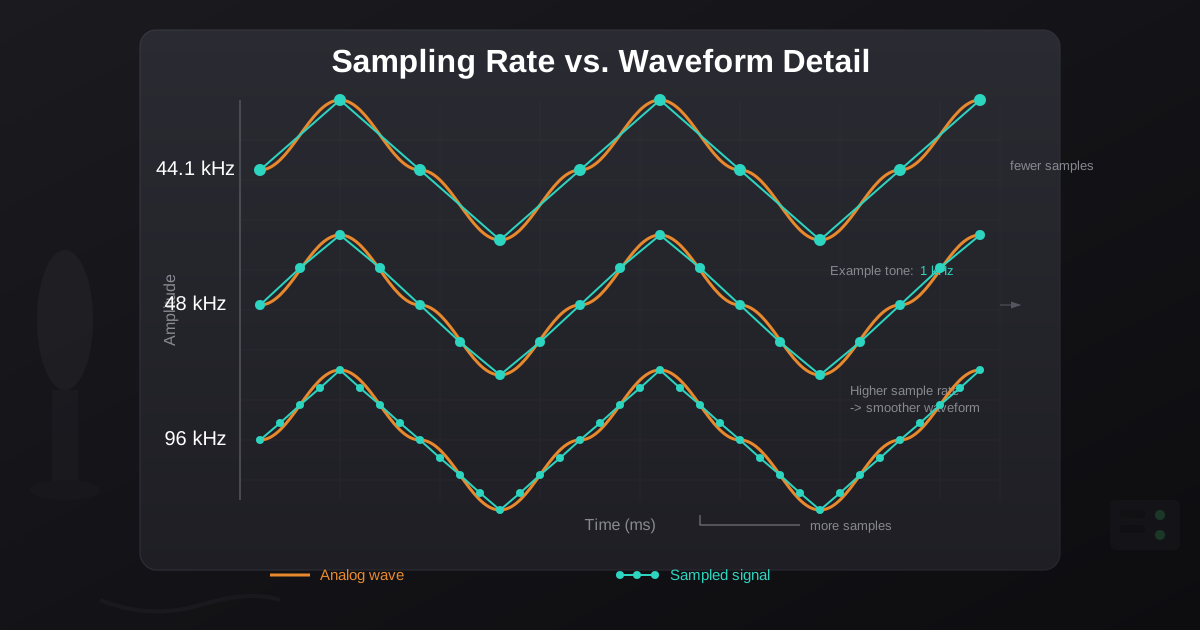
Sample rate is how many times per second audio is measured and stored digitally, expressed in kHz (kilohertz). A higher sample rate captures more detail but creates larger files. I'm not an audio engineer. The technical explanations I read about sample rates initially confused rather than clarified. Here's how I eventually understood it:
Imagine taking photographs of a moving car. If you take 10 photos per second, you capture the car's motion in rough chunks. If you take 100 photos per second, you capture much smoother motion detail.
Sample rate works similarly for audio. It's how many times per second the audio is measured and stored digitally. A higher sample rate captures more detail, just like more photographs capture smoother motion.
Sample rates are measured in kHz (kilohertz), which means thousands of samples per second:
- 44.1 kHz = 44,100 measurements per second
- 48 kHz = 48,000 measurements per second
- 96 kHz = 96,000 measurements per second
The higher the number, the more detail captured, but also the larger the file size and more processing required.
What Is the Nyquist Limit and Why Is 44.1kHz the CD Standard?
The Nyquist theorem states that a sample rate can accurately capture frequencies up to half the sample rate. This is why 44.1kHz became the CD standard - it captures up to 22.05kHz, slightly above the 20kHz upper limit of human hearing.
Simply put: a sample rate can accurately capture frequencies up to half the sample rate.
This means:
- 44.1 kHz can capture up to 22.05 kHz frequencies
- 48 kHz can capture up to 24 kHz frequencies
- 96 kHz can capture up to 48 kHz frequencies
Human hearing typically ranges from 20 Hz to 20 kHz. This explains why 44.1 kHz became standard for music - it captures slightly more than the full range of human hearing.
Understanding this rule helped me stop worrying about theoretical limits and focus on practical needs. For human listeners, anything above 44.1 kHz captures more than we can hear.
44.1kHz vs 48kHz vs 96kHz: Which Should You Choose?
After my podcast disaster, I researched every common sample rate and tested them in real-world situations. Here's what I learned about when each actually makes sense.
When Should I Use 44.1kHz Sample Rate?
Use 44.1kHz for music-only projects, especially if distributing to streaming services or CD. This is what CDs use. It became the standard in the 1980s and remains dominant for music distribution.
I use 44.1 kHz when:
- Recording music or music-focused content
- Preparing audio for music distribution (Spotify, Apple Music, etc.)
- Creating content that might be distributed on CD
- Working on projects where the final destination is music-focused
File size reference: A 3-minute stereo song at 44.1 kHz with 16-bit depth is approximately 30 MB uncompressed.
Real experience: I recorded a short audio drama at 44.1 kHz. The dialogue, sound effects, and music all sounded excellent. When I uploaded to various platforms, no conversion was needed for music platforms. This rate just works for traditional audio content.
When Should I Use 48kHz Sample Rate?
Use 48kHz for any project involving video, including YouTube, podcasts with video clips, and film production. Film, television, and video use 48kHz as standard. After my sync disaster, I learned that video production chose 48kHz because it divides evenly with common video frame rates.
I use 48 kHz when:
- Recording any content that will include video
- Creating podcasts that might become video content later
- Producing content for YouTube, streaming platforms, or television
- Working on anything related to film or video production
File size reference: That same 3-minute stereo recording at 48 kHz is approximately 33 MB uncompressed - about 10% larger than 44.1 kHz.
Real experience: After my sync problems, I switched all my video podcast recording to 48 kHz. The audio-video sync issues disappeared completely. Even when editing together clips from different sessions, everything stayed in sync. The small file size increase was worth never dealing with drift again.
Is 32kHz Sample Rate Good Enough for Voice?
Yes, 32kHz is perfectly adequate for voice-only recordings like podcasts, audiobooks, and interviews. I initially dismissed 32kHz as too low quality. Then I tested it for voice-only content and was surprised.
I use 32 kHz when:
- Recording voice-only podcasts without music
- Creating long-form spoken content where file size matters
- Producing content for listeners who stream on limited bandwidth
- Recording interviews where voice clarity matters more than high-fidelity sound
File size reference: That 3-minute recording at 32 kHz is approximately 22 MB uncompressed - about 27% smaller than 44.1 kHz.
Real experience: I recorded a test episode of my podcast at 32 kHz, 44.1 kHz, and 48 kHz, then asked 20 listeners to rate them. For voice-only content, nobody consistently identified quality differences. The 32 kHz version sounded identical for spoken word. I now use 32 kHz for preliminary interviews and phone call recordings where I need smaller files.
When Should I Use 96kHz Sample Rate?
Use 96kHz when recording audio that will be heavily processed, pitch-shifted, or time-stretched. I tested 96kHz for several projects to see if I could hear the difference. For final delivery, I usually couldn't. But during production, it offered real advantages.
I use 96 kHz when:
- Recording source material that will be heavily processed
- Creating sound effects that will be pitch-shifted or time-stretched
- Recording music where I plan extensive editing and manipulation
- Archiving important recordings for future use
File size reference: That 3-minute recording at 96 kHz is approximately 66 MB uncompressed - more than double 44.1 kHz.
Real experience: I recorded a guitar part at both 48 kHz and 96 kHz, then slowed it down 50% for a dramatic effect. The 96 kHz version handled the manipulation much better with fewer artifacts. When I exported both to 48 kHz for final delivery, the one sourced from 96 kHz sounded noticeably cleaner. The high sample rate provided processing headroom even though the final output was lower.
Is 192kHz Sample Rate Worth It?
For most users, no. 192kHz is overkill except for archiving historically significant recordings. Honestly, I've found very few practical uses for 192kHz in my work. The files are enormous, processing is slow, and I can't hear quality differences in the final product.
I might use 192 kHz when:
- Archiving historically significant recordings
- Recording acoustic instruments for sample libraries that will be heavily manipulated
- Capturing sound effects for professional film production where extreme processing is planned
File size reference: That 3-minute recording at 192 kHz is approximately 132 MB uncompressed - more than 4x the size of 44.1 kHz.
Real experience: I recorded a live classical ensemble at 192 kHz for archival purposes. The files filled my storage quickly. Processing took dramatically longer. When I compared it to the same recording at 96 kHz, I couldn't reliably hear differences. For most purposes, 192 kHz is overkill.
Common Sample Rate Mistakes to Avoid
My sample rate education came through making mistakes. Here are the expensive lessons I learned.
Can I Mix Different Sample Rates in One Project?
You can, but it causes problems. This was my six-month podcast disaster. I recorded guests at different sample rates, then tried editing them together.
What happened: My editing software converted everything to match during playback and export. These real-time conversions introduced clicks, pops, and weird phase problems. Some conversions were worse than others - 44.1 to 48 kHz created more audible issues than 32 to 48 kHz.
What I learned: Decide on one sample rate for an entire project before recording anything. Stick to it religiously. Put the sample rate in your recording checklist. For my podcast, I now use 48 kHz for everything - interviews, intro music, sound effects, everything.
How to avoid it: Set your sample rate at the start of a project and verify it before every recording session. I literally have a sticky note on my recording interface that says "48 kHz" to remind myself to check.
Does Converting to a Higher Sample Rate Improve Quality?
No, upsampling does not improve audio quality. I recorded an interview at 44.1kHz, then "improved" it by converting to 96kHz before editing. I thought the higher sample rate would make it sound better.
What happened: The audio didn't improve at all. Upsampling doesn't create detail that wasn't captured during recording. The file just got bigger with no quality gain. I wasted storage space and processing time for zero benefit.
What I learned: Sample rate is set during recording. You can't improve audio quality by converting to a higher rate later. If you need 96 kHz, record at 96 kHz. Converting up after the fact is pointless.
How to avoid it: Only convert sample rates down for compatibility or file size reasons. Never convert up expecting quality improvement.
Mistake 3: Using High Sample Rates for Final Delivery
I produced an entire album at 96 kHz and delivered it to the distribution service at that rate, thinking it would preserve maximum quality.
What happened: The distribution service converted everything to 44.1 kHz anyway. My high sample rate source didn't result in better final quality. I'd wasted storage and bandwidth uploading files that were immediately downsampled.
What I learned: Research your distribution platform's specifications. Most streaming services, social media platforms, and broadcast standards use 44.1 or 48 kHz. Delivering higher rates doesn't improve the final product.
How to avoid it: Match your final export sample rate to your distribution platform's specifications. I now master at 96 kHz for archival purposes but export deliverables at 44.1 or 48 kHz depending on the platform.
Mistake 4: Ignoring Sample Rate in Video Projects
I recorded beautiful audio at 44.1 kHz for a video project where the video was 48 kHz. I thought the software would handle conversion seamlessly.
What happened: The audio-video sync slowly drifted over the 30-minute video. By the end, dialogue was noticeably out of sync with mouth movements. Fixing this required manual time-stretching that introduced subtle artifacts.
What I learned: For any video project, use 48 kHz audio from the start. It's the video industry standard for good reason. Even if your audio software defaults to 44.1 kHz, change it to 48 kHz for video work.
How to avoid it: Create separate recording presets for audio-only projects (44.1 kHz) and video projects (48 kHz). Check the setting before every video recording session.
Mistake 5: Judging Quality on Consumer Headphones
I recorded test files at different sample rates and compared them on my $50 headphones. I couldn't hear differences, so I concluded sample rates didn't matter.
What happened: When I later heard those same recordings on professional monitors, the differences were obvious. My consumer headphones physically couldn't reproduce the frequencies where sample rate differences are most audible.
What I learned: Sample rate differences are subtle and require decent listening equipment to hear. If you're testing on earbuds or consumer headphones, you may not hear what's actually there.
How to avoid it: Make sample rate decisions based on technical requirements and workflow, not just on what you can hear on your current equipment. Your listeners might have better gear than you do.
My Current Sample Rate Decision Tree
After three years of trial and error, I've developed a simple decision process for choosing sample rates.
Question 1: Is This for Video?
If yes → 48 kHz always. No exceptions. Video production uses 48 kHz as standard. Using anything else creates sync problems and workflow friction. Even if I think the project might not include video, if there's any chance it could, I use 48 kHz.
Question 2: Will This Be Heavily Processed?
If yes → 96 kHz for recording, 44.1 or 48 for delivery. When I know I'll be pitch-shifting, time-stretching, heavily EQ-ing, or otherwise manipulating audio extensively, I record at 96 kHz. This provides headroom for processing. But I still deliver the final product at standard rates.
Question 3: Is This Voice-Only Content Without Music?
If yes → 32 kHz is acceptable. For podcast interviews, audiobooks, or voice memos, 32 kHz captures perfectly adequate quality for human voice while keeping file sizes manageable. I tested this extensively and listeners couldn't hear the difference for spoken content.
Question 4: Is This Music or Music-Adjacent Content?
If yes → 44.1 kHz for recording and delivery unless video is involved (then 48 kHz). This matches music distribution standards and what listeners expect for musical content.
Question 5: Is This Archival or Historically Important?
If yes → 96 kHz minimum. For recordings that will be preserved long-term or have historical value, I use the highest practical sample rate. Storage is cheap compared to never being able to re-record something important.
Default: When In Doubt
Use 48 kHz. It works for everything. Video industry uses it. It converts cleanly to 44.1 if needed. It's high enough for excellent quality but not so high that files become unwieldy. My default recording preset is 48 kHz because it's the most universally appropriate choice.
The Technical Details That Actually Matter
Some technical aspects of sample rates genuinely affect practical work. Others are theoretical concerns that don't matter in real-world use.
Bit Depth vs. Sample Rate
I initially confused these two concepts. They're related but different.
Sample rate determines how frequently audio is measured (time resolution). Bit depth determines how precisely each measurement is captured (amplitude resolution).
Think of it like video: sample rate is like frames per second, bit depth is like color depth per frame. Both affect quality but in different ways.
For most work, I use:
- 16-bit depth for final delivery (CD quality)
- 24-bit depth for recording and processing (provides headroom)
The combination of 48 kHz sample rate and 24-bit depth gives me excellent quality with manageable file sizes.
Sample Rate Conversion Quality
Not all sample rate conversions are equal. I learned this when comparing conversion algorithms.
Poor conversion (linear interpolation) introduces obvious artifacts - digital harshness, frequency roll-off, and weird phase issues.
Good conversion (windowed sinc or polyphase filtering) is nearly transparent if converting between related rates.
The audio editing software you use makes a huge difference. Professional software like Pro Tools or Reaper uses high-quality conversion. Some free or basic software uses poor algorithms that damage audio quality.
My experience: I tested sample rate conversion in four different programs. The quality ranged from obviously degraded to imperceptible. Now I only convert in professional software, and I still avoid conversion whenever possible by recording at the correct rate initially.
Frequency Response Reality
Theoretically, 44.1 kHz captures frequencies up to 22.05 kHz. Human hearing caps around 20 kHz. So 44.1 kHz should be perfect.
In reality, it's slightly more complicated. Anti-aliasing filters needed for digital audio aren't perfect. They require a transition band. Real-world 44.1 kHz systems typically capture cleanly to about 20 kHz, with some roll-off in the 20-22 kHz range.
For human hearing, this doesn't matter. But understanding it explained why professionals sometimes prefer 48 kHz even for audio-only work - the wider frequency capture allows for gentler, better-sounding filters.
Practical implication: For critical listening or professional work, 48 kHz provides a bit more frequency headroom than 44.1 kHz. The difference is subtle but real.
File Size Impact in Real Numbers
File sizes matter for storage, upload speed, and processing efficiency. Here are actual file sizes from my projects:
30-minute podcast episode (stereo, 16-bit):
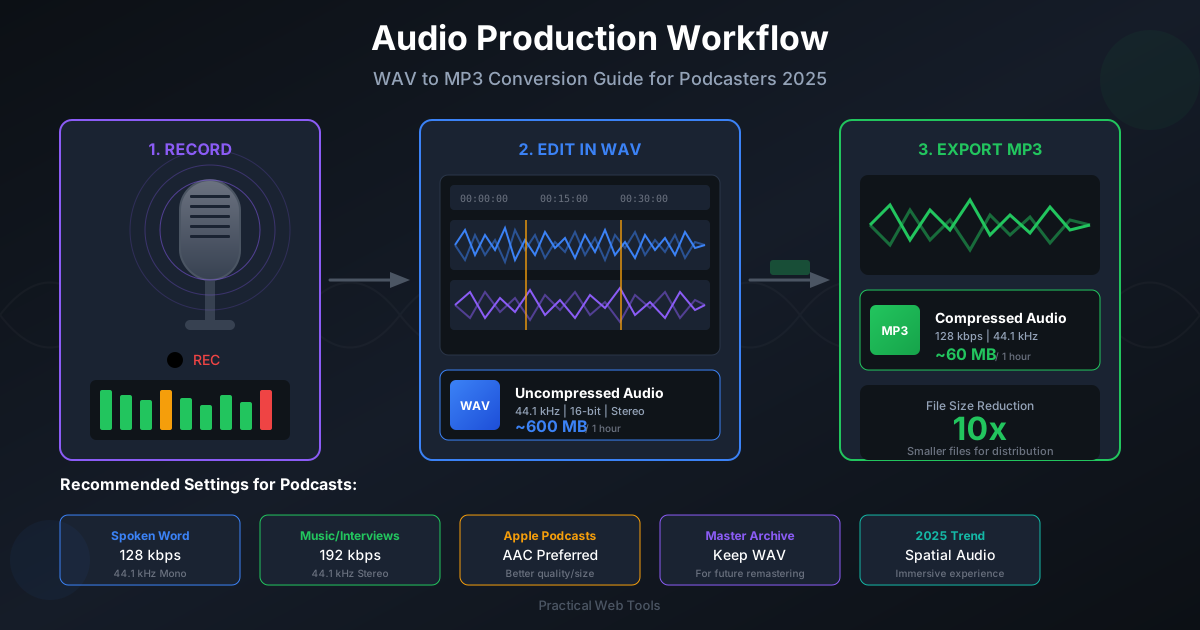
- 32 kHz: 117 MB uncompressed, ~13 MB compressed to 128 kbps MP3
- 44.1 kHz: 162 MB uncompressed, ~15 MB compressed to 128 kbps MP3
- 48 kHz: 176 MB uncompressed, ~16 MB compressed to 128 kbps MP3
- 96 kHz: 352 MB uncompressed, ~16 MB compressed to 128 kbps MP3
Key observations:
- Higher sample rates create proportionally larger uncompressed files
- After compression to distribution formats, file size differences shrink dramatically
- For final distribution, sample rate affects quality more than file size
- For working files and project archives, sample rate significantly affects storage needs
My current project drive contains about 500 GB of podcast audio at 48 kHz. If I'd recorded everything at 96 kHz, I'd need about 1 TB of storage instead. Sample rate choice has real infrastructure implications for ongoing projects.
Platform-Specific Recommendations
Different platforms have different optimal sample rates. I learned this by reading technical specifications and testing output quality.
YouTube
Recommendation: 48 kHz
YouTube's audio processing pipeline is optimized for 48 kHz. Their documentation explicitly recommends it. I tested by uploading the same video with 44.1, 48, and 96 kHz audio. The 48 kHz version had fewer artifacts after YouTube's processing. The 96 kHz version was converted down anyway, so the high sample rate provided no benefit.
Podcast Platforms (Spotify, Apple Podcasts, etc.)
Recommendation: 44.1 kHz or 48 kHz
Most podcast platforms accept either and convert to their internal formats. I tested both extensively and couldn't hear quality differences after their processing. I use 48 kHz by default because my podcast workflow includes video clips, but 44.1 kHz works equally well for audio-only shows.
Music Streaming (Spotify, Apple Music, Tidal)
Recommendation: 44.1 kHz
Music distribution services expect 44.1 kHz as standard. Some support higher rates for "high-resolution" tiers, but most subscribers listen at standard quality. I master music at 96 kHz for archival but deliver to distributors at 44.1 kHz.
Instagram and TikTok
Recommendation: 48 kHz
Social media video platforms process audio aggressively. They compress heavily and apply normalization. I tested various sample rates and 48 kHz worked best. Higher rates showed no quality advantage and just made upload files larger.
Broadcast Television
Recommendation: 48 kHz (required)
Professional broadcast standards require 48 kHz. No choice here. If you're producing content for television broadcast, use 48 kHz.
The Tools I Actually Use
Sample rate selection matters, but so does the quality of conversion when it's necessary.
For Recording
I use Audacity for most recording. It's free, reliable, and lets me set sample rate explicitly. Before every recording session, I verify the sample rate setting matches my project requirements.
For video, I use OBS Studio set to 48 kHz audio. The setting is in the audio configuration, and I've saved a profile specifically for podcast recording so I don't have to remember to change it every time.
For Conversion
When I absolutely must convert between sample rates, I use professional software with high-quality algorithms. Cheap or rushed conversion ruins audio.
For file format conversion while maintaining quality, I use Practical Web Tools' audio converter. It processes in my browser, so my files don't upload to external servers. This matters for podcast episodes that contain confidential guest interviews or early-release music.
The tool handles sample rate conversion well, though I still try to avoid conversion by recording at the correct rate initially.
For Monitoring
I use Spek to visualize audio frequency content. This free spectrum analyzer helps me verify that sample rate conversions haven't damaged high-frequency content. I can literally see if conversion introduced artifacts or rolled off frequencies.
The One Thing I Wish I'd Known Earlier
If I could go back and tell myself one thing before starting my podcast, it would be this:
Sample rate is a project-level decision, not a per-file decision.
I thought I could record different elements at different sample rates and mix them together. Technically possible, yes. Good idea, absolutely not.
Choosing one sample rate for an entire project from the beginning eliminates so many problems:
- No sync drift
- No quality degradation from conversion
- Consistent processing across all audio
- Simplified workflow without constant rate checking
Now, before starting any audio project, I create a one-page project spec that includes the target sample rate. Every recording session for that project uses that rate. Every imported audio is converted to that rate immediately upon import. Every export uses that rate.
This simple discipline has prevented countless hours of troubleshooting and reprocessing.
Moving Forward with Sample Rates
Sample rates seemed like mysterious technical jargon before I was forced to understand them. Now I see them as straightforward decisions with clear right answers for different situations.
For my podcast: 48 kHz, always. No exceptions.
For music production: 96 kHz during recording and production, 44.1 kHz for delivery.
For voice memos and quick interviews: 32 kHz is perfectly fine.
These aren't rigid rules. They're guidelines based on three years of real-world experience, testing, and learning from mistakes.
The six months of podcast episodes I nearly ruined taught me that understanding sample rates isn't optional technical knowledge. It's fundamental to audio work. Getting it right from the start saves enormous time and preserves quality.
Your projects deserve better than my early mistakes. Choose your sample rate deliberately, document it for your project, verify it before every recording session, and stick with it consistently.
Ready to convert audio files between formats or sample rates? Use our audio converter tool - everything processes in your browser with complete privacy, no server uploads required.
Frequently Asked Questions About Audio Sample Rates
What sample rate should I use for YouTube? Use 48kHz for YouTube. YouTube's audio processing pipeline is optimized for 48kHz, and using this rate prevents conversion artifacts. This matches the video industry standard and ensures the best audio quality in your uploaded videos.
Is 44.1kHz or 48kHz better for music? For music-only projects distributed on streaming services or CD, 44.1kHz is the standard. For music that might be used in video, use 48kHz. There's no audible quality difference between the two for human listeners - the choice is about workflow compatibility.
Can you hear the difference between 44.1kHz and 48kHz? No, humans cannot hear the difference between 44.1kHz and 48kHz sample rates. Both capture frequencies well beyond the range of human hearing (20Hz-20kHz). The choice between them is about compatibility with your workflow, not audio quality.
Why do videos use 48kHz instead of 44.1kHz? Video production uses 48kHz because it divides evenly with common video frame rates (24, 25, 30, 60 fps), preventing audio-video sync drift issues. The film and broadcast industry standardized on 48kHz in the 1980s for this technical reason.
What sample rate do streaming services use? Most streaming services (Spotify, Apple Music, Amazon Music) accept 44.1kHz or 48kHz and convert to their internal formats. For music distribution, 44.1kHz is preferred as it matches the CD standard and avoids unnecessary conversion.
Should I record podcasts at 44.1kHz or 48kHz? Record podcasts at 48kHz if there's any chance you'll create video clips, which is the safest default. Use 44.1kHz if you're certain the podcast will remain audio-only. For voice-only content where file size matters, 32kHz is adequate.
Does higher sample rate mean better audio quality? Not necessarily for final listening. Higher sample rates (96kHz, 192kHz) provide benefits during audio production, especially when applying heavy processing, pitch-shifting, or time-stretching. For final delivery to human listeners, anything above 44.1kHz captures more than we can hear.
What sample rate should I use for recording vocals? For vocals, use 48kHz as a safe default that works with both audio-only and video projects. If recording for music production where heavy processing is planned, 96kHz provides more headroom. For simple podcast vocals, even 32kHz is sufficient for clear speech.