The Hidden Data Risks of Cloud-Based AI Tools (And How to Avoid Them)
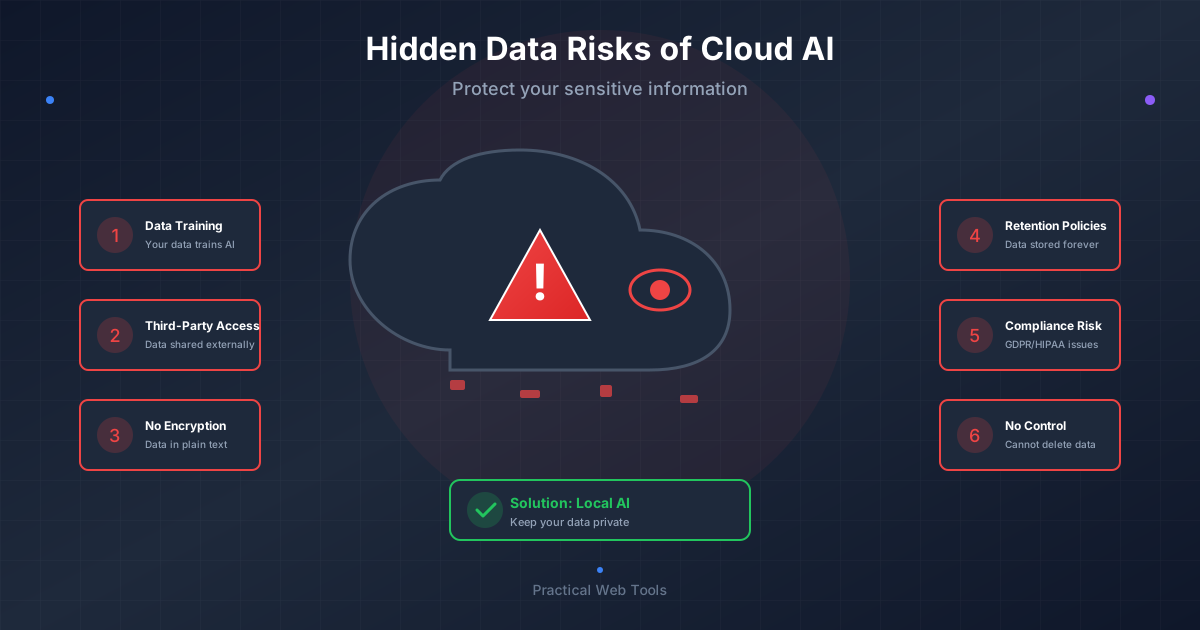
What are the hidden data risks of cloud AI tools? When you use ChatGPT, Claude, or Gemini, your data is transmitted to external servers, potentially logged for 30+ days, accessible to employees and contractors, subject to government subpoenas, and may be used for model training unless you explicitly opt out. Every prompt creates a permanent record that could be exposed through breaches, legal discovery, or training data leaks.
Last month, I was reviewing our company's cloud AI usage when I discovered something that made my stomach drop. One of our product managers had pasted our entire 2026 product roadmap into ChatGPT, asking it to "identify potential gaps and suggest improvements."
Our competitive strategy. Unannounced features. Market positioning. Revenue projections. Technical approaches. All of it sitting on OpenAI's servers, potentially forever.
When I asked why, the response was honest: "I didn't think about it. It's just a chatbot. Where else would the data go?"
That response captures exactly why cloud AI poses serious risks. Most people treat these tools like conversations that disappear afterward. But every prompt creates a digital record that could be accessed by employees, contractors, hackers, government agencies, or used to train future AI models that might leak fragments of your data to competitors.
I spent the next two weeks investigating our team's AI usage. The audit was terrifying:
- Engineering had pasted proprietary code for debugging help
- Sales had uploaded client proposals for refinement
- HR had used AI to draft termination letters with employee names
- Finance had analyzed budget data containing sensitive salary information
All of this data now exists on external servers we don't control, subject to terms of service we never read carefully, potentially accessible to parties we never authorized.
That discovery led me down a months-long journey into cloud AI privacy, data handling practices, and safer alternatives. I'm going to share what I learned, because most people using AI tools have no idea what's happening to their data.
How Much Personal Data Do Cloud AI Services Store?
Before I get into the risks, let me share my personal wake-up call about this issue. It wasn't the product roadmap incident, though that was bad enough.
Six months ago, I requested my data from ChatGPT through their privacy portal. OpenAI is required to provide this under various privacy laws, so they sent me an export of everything they had.
The ZIP file contained 847 conversations spanning 14 months. I had forgotten most of them existed.
As I read through my chat history, I felt increasingly sick:
Business Strategy Discussions: I had workshopped our pricing model, discussed which competitors to target, outlined our go-to-market strategy. Complete competitive intelligence, neatly organized and stored.
Technical Architecture: I had pasted code snippets, database schemas, API designs. Anyone analyzing this data could reconstruct significant portions of our technical stack.
Client Information: While I'd been careful not to use names, I'd discussed specific client situations with enough detail that anyone familiar with our industry could identify them.
Personal Finance: I'd asked AI to analyze my investment portfolio, discuss tax strategies, calculate retirement projections. My complete financial picture was documented.
Medical Questions: Health concerns I'd researched, symptoms I'd described, medications I'd asked about. Protected health information, except I'd voluntarily sent it to a third party.
Passwords and API Keys: Most embarrassing, I found a conversation where I'd accidentally pasted a block of code containing API credentials. I'd caught it and deleted the message within minutes, but the export showed it had still been logged.
That export was my data from just one service. I also use Claude, Gemini, and several other AI tools. All of them have similar records of my activity.
The scale of exposure was staggering. Years of my thinking, planning, and problem-solving, all documented in detail and stored indefinitely on servers I don't control.
What Happens to Your Data When You Use Cloud AI?
Most people think of cloud AI interactions as ephemeral conversations. Type a question, get a response, move on. The conversation exists only in that moment, right?
Wrong. Every prompt you send begins a journey through infrastructure you don't see, creating records you can't delete, accessible by people you don't know.
What Is the Data Journey When You Send a Prompt?
When you hit send on a ChatGPT, Claude, or Gemini prompt, here's what actually happens:
Step 1: Transmission to the Cloud
Your text leaves your device and travels across the internet. While encrypted in transit via HTTPS, it must be decrypted at the destination. The AI provider sees your complete, unencrypted input.
Step 2: Server-Side Logging
Your prompt arrives at the provider's data center. Depending on company policies:
- The prompt is typically logged with timestamp, user ID, and IP address
- Metadata is recorded (conversation context, model version, response time)
- The interaction is stored in databases for various retention periods
- Your prompt may be queued for human review if it triggers content filters
Step 3: Model Processing
Your input gets processed by the AI model:
- Tokenization breaks it into processable units
- Inference happens across multiple GPU servers
- Intermediate representations may be cached
- The entire exchange is typically logged for debugging
Step 4: Response Delivery and Storage
The AI's response travels back to you, but:
- The complete conversation is often stored in your account history
- The exchange might be flagged for quality review
- Both prompt and response could be added to training data pipelines
- Usage analytics are definitely recorded
Step 5: Retention
Even after you delete a conversation from your interface, copies often exist in:
- Backup systems (30+ days typically)
- Log files (retention varies)
- Training datasets (potentially permanent)
- Content moderation queues
- Analytics databases
- Legal hold systems
That "ephemeral conversation" has created permanent records across multiple systems.
Who Can Access Your Cloud AI Data?
Along this journey, your data is potentially accessible to far more parties than you imagine:
AI Company Employees:
- Engineers debugging system issues
- Trust and safety teams reviewing flagged content
- Data scientists improving model quality
- Customer support staff (for paid accounts)
- Security teams investigating threats
- Legal and compliance staff
I spoke with a former employee of a major AI company who told me: "The number of people with database access was shocking. Contractors, offshore teams, third-party vendors. The access controls were nowhere near as strict as people assume."
Infrastructure Providers:
- Cloud hosting services (AWS, Azure, Google Cloud)
- Content delivery networks
- Database service providers
- Monitoring and analytics vendors
- Security scanning services
Third Parties:
- Data annotation contractors (labeling data for training)
- Research partners (some companies share anonymized data)
- Law enforcement (via legal process)
- Government agencies (via subpoena or national security letters)
Automated Systems:
- Content moderation algorithms
- Training data pipelines
- Security scanning tools
- Quality assurance systems
- Analytics platforms
Every one of these represents a potential exposure point for your sensitive data.
Does ChatGPT Use Your Data for Training?
Perhaps the most concerning aspect: your conversations may become training data for future AI models.
Here's what I learned from researching various AI providers' policies:
OpenAI (ChatGPT): Free and Plus tier conversations are used for training by default. You can opt out, but it's not the default. Team and Enterprise tiers have different policies.
Anthropic (Claude): Consumer conversations may be used for training unless opted out. API usage has different default policies.
Google (Gemini): Human reviewers may read and annotate conversations. Data may contribute to service improvement.
Microsoft (Copilot): Consumer and enterprise products have vastly different policies, and the complexity makes it hard to know what you've agreed to.
The problem with training data isn't just that your data is stored. It's that patterns, phrasings, and concepts from your prompts could influence outputs shown to other users.
Researchers have demonstrated that large language models can "memorize" portions of training data and reproduce them under certain conditions. If your confidential business strategy becomes training data, fragments of it could theoretically appear in responses to competitors asking similar questions.
What Are Real Examples of Cloud AI Data Leaks?
These aren't hypothetical risks. Here are actual incidents I've documented or experienced personally.
The Leaked API Keys Incident
A developer I know was using ChatGPT to help debug authentication code. He pasted a code block that included (he thought temporarily) his AWS access keys.
He realized his mistake within 30 seconds and deleted the message.
Three weeks later, he got an AWS bill for $8,400. Someone had obtained those credentials and was using his account to mine cryptocurrency.
How did they get the keys? We'll never know for sure. But even though he deleted the message from his chat interface, it had been logged server-side. His API key was written to OpenAI's systems, and somehow ended up exposed.
The Client Proposal That Went Public
A consulting firm I worked with used Claude to refine a major client proposal. The proposal contained sensitive pricing information, proprietary methodology, and specific client challenges.
Six months later, a competitor submitted a proposal to the same client that was suspiciously similar. Same approach. Similar pricing structure. Even some identical phrasing.
Could it be coincidence? Possibly. Could the competitor have stumbled upon similar ideas independently? Maybe. Or could information from that Claude conversation have somehow influenced a model that the competitor also used?
We'll never know. That's the problem with cloud AI: you can't trace the chain of data exposure.
The Healthcare HIPAA Violation
A medical practice used ChatGPT to help summarize patient notes. The doctor thought he was being careful, using patient initials instead of names.
But the notes included: age, diagnosis, treatment history, medications, and test results. Enough information to identify patients, especially in a small community.
This is a clear HIPAA violation. Protected Health Information was shared with an unauthorized third party (OpenAI) without patient consent and without a Business Associate Agreement.
The practice discovered this during a compliance audit. They're facing potential fines between $100-$50,000 per violation. They documented over 200 instances.
The Accidentally Public Conversation
A ChatGPT bug in March 2023 exposed some users' conversation titles and portions of message history to other users. Chat titles included:
- "Confidential budget analysis"
- "Merger discussions with [company name]"
- "Security vulnerability in [product]"
Even though full conversations weren't exposed, these titles alone revealed information users never intended to share publicly.
The bug was fixed quickly, but it demonstrated a crucial point: your data security depends entirely on the AI provider's security practices. You have no control over their infrastructure, bugs, or breaches.
What Are the Legal Risks of Using Cloud AI with Sensitive Data?
Beyond obvious security risks, cloud AI usage has hidden costs that most people never think about.
The Legal Discovery Problem
Everything you type into cloud AI can be subpoenaed in legal proceedings.
A friend working for a pharmaceutical company learned this during litigation. The opposing party subpoenaed all her ChatGPT conversations. They discovered she'd used AI to draft portions of research documentation, revealing internal concerns about drug efficacy that weren't in the official record.
Those conversations became evidence that undermined her company's case.
Many people don't realize: cloud AI conversations are discoverable in:
- Employment litigation
- Intellectual property disputes
- Contract disagreements
- Divorce proceedings
- Regulatory investigations
- Criminal cases
Anything you wouldn't want read in a courtroom shouldn't go into cloud AI.
The Competitive Intelligence Risk
I now assume that anything I put into cloud AI could eventually reach competitors.
Not through deliberate espionage necessarily. But through:
- Data breaches exposing conversation histories
- Training data influencing model outputs
- Employees with access selling information
- Government seizure and subsequent leaks
- Business acquisitions bringing new data policies
Several friends working in highly competitive industries have told me their companies now explicitly ban using cloud AI for work-related tasks. The competitive risk is too high.
The Changing Terms of Service
Terms of service can change at any time, usually with little notice. That data you entrusted under one set of rules can suddenly be governed by entirely different rules.
Examples I've seen:
- Free services adding advertising (using your data to target ads)
- Privacy-focused companies getting acquired and changing data policies
- Retention periods extending from 30 days to indefinite
- Training data opt-outs being removed or made more difficult
- Data sharing with subsidiary companies after acquisitions
Once your data is on their servers, you're subject to whatever terms they decide to impose. Even retroactively.
The Metadata Privacy Issue
Even if you delete conversation content, metadata persists:
- When you use AI (times, frequency, patterns)
- What topics you ask about (based on categorization)
- How you use AI (usage patterns reveal much about work style)
- Where you use AI (IP addresses, location data)
- What devices you use (browser fingerprinting, device IDs)
This metadata creates a detailed profile of your activities, interests, and concerns. It's often retained longer than conversation content and is more readily shared with third parties.
How Can You Protect Your Data While Using Cloud AI?
I'm not suggesting you completely avoid cloud AI. But you should use it strategically, understanding and managing the risks.
Strategy 1: The Red-Yellow-Green Framework
I categorize every potential AI interaction:
Red (Never Use Cloud AI):
- Confidential business information
- Client data
- Personal financial details
- Medical information
- Anything you'd redact from public documents
- Legal matters
- Personnel issues
- Passwords, keys, credentials (obvious, but worth stating)
If it's red, I use local AI or don't use AI at all.
Yellow (Anonymize Before Using Cloud AI):
- Code that might reveal proprietary approaches (remove comments, business logic)
- Business scenarios (replace real names with placeholders)
- General strategy discussions (stay high-level)
- Technical questions (strip identifying details)
For yellow category, I spend time carefully sanitizing data before pasting it into cloud AI. Replace names with "Company A", "Person X". Remove numbers that might be identifying. Generalize specific details.
Green (OK for Cloud AI):
- Publicly available information
- General knowledge questions
- Learning and education
- Creative writing with fictional content
- Code examples using public APIs
- Open-source project discussions
If it's information I'd be comfortable publishing on a public blog, it's green.
I actually maintain a checklist I run through before using cloud AI:
- Does this contain any confidential information? (Red)
- Could this benefit a competitor? (Red)
- Does this include personal information about real people? (Red)
- Would I be comfortable if this appeared in a news article? (If no: Red)
- Can I anonymize enough to make it non-sensitive? (If yes: Yellow)
Strategy 2: Use Separate Accounts for Different Contexts
I maintain separate AI accounts:
Personal Account: Health questions, finance, personal projects. Not linked to work email.
Professional Account (Sanitized): Only for green-category work tasks. Never contains actual client names, proprietary information, or confidential data.
Throwaway Accounts: For truly sensitive questions where I want extra separation. Created with temporary emails, used for specific projects, then abandoned.
This separation means a breach of one account doesn't expose everything.
Strategy 3: Regular Conversation Purges
Every month, I delete my cloud AI conversation history. All of it.
Does this prevent the data from existing in backups and logs? No. But it:
- Reduces my surface area of exposure
- Limits what's immediately accessible to employees or hackers
- Forces me to regularly review what I've shared
- Makes comprehensive data export smaller (I still request these quarterly)
OpenAI retains deleted conversations for 30 days. After that, they claim it's fully deleted from their systems (though backups may persist longer). It's not perfect protection, but it's better than indefinite retention.
Strategy 4: Opt Out of Everything Possible
I've opted out of:
- Training data contribution (where available)
- Conversation history saving (on platforms that allow it)
- Data sharing for improvements
- Usage analytics (where possible)
- Marketing communications
- Third-party data sharing
These options are usually buried in settings menus. I check them quarterly because providers sometimes add new data sharing defaults after terms of service updates.
Strategy 5: API Access for Higher Privacy
For work purposes, I pay for API access to AI services rather than using the free web interfaces.
API terms typically include:
- No training on your data by default
- Shorter retention periods
- Clearer data handling policies
- Business Associate Agreements (for healthcare)
- Enterprise controls
It's more expensive, but the privacy guarantees are stronger. For my business use, the cost is worth the reduced risk.
Is Local AI a Better Alternative for Privacy?
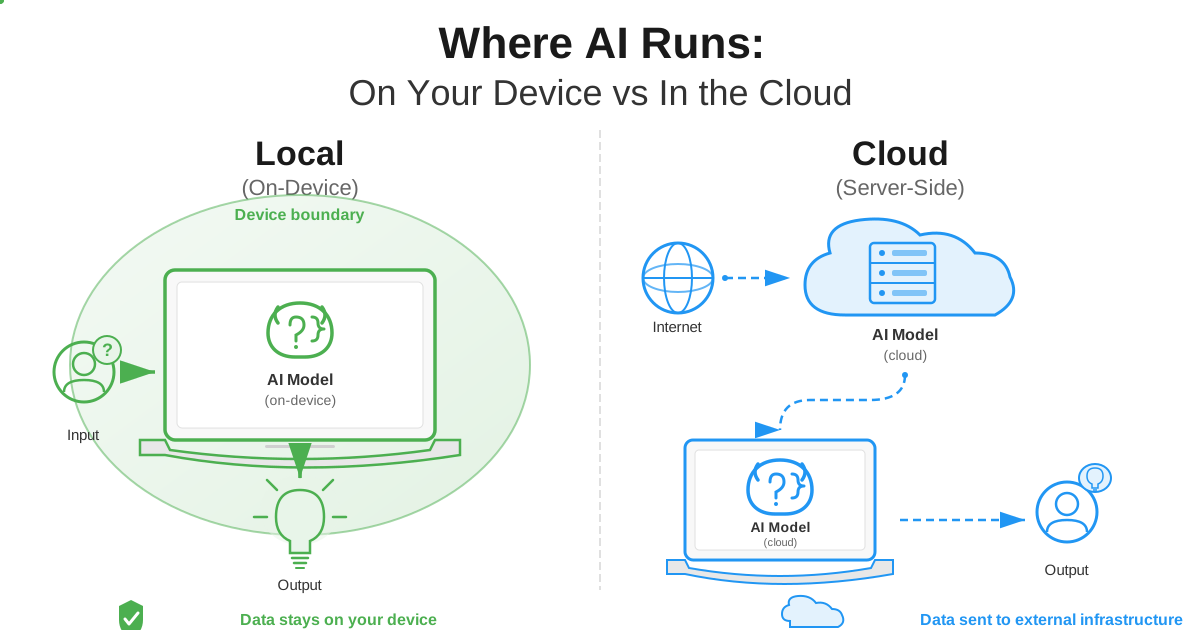
Here's the solution I eventually landed on for sensitive work: local AI that never touches the cloud.
What Local AI Actually Means
Local AI refers to running AI models entirely on your own hardware:
- Download open-source models to your computer
- Install software to run them locally
- Interact through local interfaces
- All processing happens on your machine
- Zero data leaves your computer
I was skeptical at first. Surely local models would be dramatically worse than cloud services, right?
I was wrong. Modern open-source AI models are remarkably capable, and they're improving rapidly.
My Local AI Setup
After months of testing, here's my current setup:
Hardware: Nothing special. My work laptop has 32GB RAM and a decent (not cutting-edge) GPU. Sufficient for running capable local models.
Software: I use Ollama for model management. Clean interface, simple commands, works perfectly.
Models: I primarily use:
- Llama 3.2 (Meta) for general tasks
- Mistral 7B for code assistance
- Qwen for technical writing
Use Cases That Work Perfectly Locally:
- Code debugging and generation
- Document drafting and editing
- Data analysis of sensitive information
- Strategy brainstorming
- Technical problem-solving
- Research assistance
Where Local AI Excels
For my use cases, local AI is actually better than cloud AI in several ways:
Privacy: The obvious one. My data never leaves my computer. Period. No employees can read it. No hackers can steal it. No subpoenas can force it to be disclosed (unless my actual computer is seized).
Cost: After the initial hardware investment, it's free. No subscription fees. No API costs. Unlimited usage.
Speed: No network latency. Responses start generating immediately. For shorter interactions, it's actually faster than cloud AI.
Availability: Works offline. No internet connection required. This has saved me multiple times while traveling or during internet outages.
Customization: I can fine-tune models on my own data, knowing that data never leaves my control.
The Honest Limitations
Local AI isn't perfect. Here are the genuine limitations I've encountered:
Model Quality: The very best cloud models (GPT-4, Claude 3.5) are still somewhat better for complex reasoning. But the gap is narrowing fast.
Hardware Requirements: You need decent hardware. 16GB RAM minimum, 32GB recommended. GPU helps significantly for longer responses.
Setup Time: Initial setup takes an hour or two. Not difficult, but not as instant as opening ChatGPT.
Model Size Management: Large models require significant disk space (tens of gigabytes). You'll need storage for the models you use regularly.
The Surprising Benefits I Discovered
Beyond privacy, local AI has given me unexpected advantages:
No Censorship: Cloud AI has extensive content filters. Local AI doesn't. For legitimate uses (research, creative writing, security testing), this is valuable.
Complete Control: I can see exactly what the model does, modify its behavior, and understand its limitations.
Experimentation: With no usage costs, I can experiment freely. Try different approaches, test various models, refine prompts without worrying about burning through API credits.
Trust: I know exactly where my data is. Not theoretically. Actually. It's on my hard drive. Backed up to my encrypted drives. Under my control.
How Do You Switch from Cloud AI to Local AI?
You don't need to choose between cloud AI and local AI. I use both, strategically.
Week 1: Audit Your Current Usage
Before changing anything:
- Request your data from all AI services you use
- Review what you've actually shared
- Categorize your usage (Red/Yellow/Green framework)
- Identify patterns that concern you
This audit usually shocks people. I've never had someone do this and not discover they'd shared more sensitive information than they realized.
Week 2: Implement Immediate Protections
Quick wins while you explore alternatives:
- Delete conversation histories
- Opt out of training data usage
- Stop using cloud AI for red-category data immediately
- Set up separate personal/professional accounts
- Enable all privacy settings
Week 3: Test Local AI
Try it before committing:
- Install Ollama (takes 10 minutes)
- Download a starter model (I recommend Llama 3.2)
- Try using it for one week for sensitive tasks
- Compare results to your cloud AI experience
Most people are surprised by how well it works.
Week 4: Establish New Workflows
Create sustainable practices:
- Default to local AI for sensitive work
- Use cloud AI for public/non-sensitive tasks
- Implement red-yellow-green categorization
- Train team members on the framework
- Document company policy
Frequently Asked Questions About Cloud AI Privacy Risks
Can I delete my data from ChatGPT and Claude?
You can delete conversation history from your interface, but this does not guarantee complete removal. OpenAI retains deleted conversations for approximately 30 days before claiming full deletion. Backups may persist longer. Data already used for training cannot be removed. Request a data export first to understand what they have before deleting.
Is the paid version of ChatGPT more private than the free version?
Somewhat. ChatGPT Plus ($20/month) allows you to opt out of training data contribution, while the free tier uses conversations for training by default. However, both versions still transmit data to OpenAI servers, log conversations, and retain data according to similar policies. Enterprise tiers offer stronger contractual protections.
Are API calls to cloud AI more private than web interface use?
Yes, generally. API terms typically include no training on your data by default, shorter retention periods, and clearer data handling policies. You can also implement your own logging and access controls. However, data still leaves your infrastructure and exists on provider servers.
What data does cloud AI collect besides my prompts?
Cloud AI services collect extensive metadata including: timestamps and frequency of use, IP addresses and location data, browser fingerprints and device identifiers, session patterns, and usage analytics. This metadata creates a detailed profile even if you delete conversation content.
Can my cloud AI conversations be subpoenaed in a lawsuit?
Yes. Cloud AI conversation history is discoverable in legal proceedings including employment litigation, intellectual property disputes, divorce proceedings, regulatory investigations, and criminal cases. Anything you would not want read in a courtroom should not go into cloud AI.
Does using cloud AI on company devices expose employer to liability?
Potentially. Employees sharing confidential business information, trade secrets, or regulated data through cloud AI could create legal liability for the organization. Many companies now require explicit policies governing AI tool usage for this reason.
How do I know if my cloud AI data was part of a breach?
Most cloud AI providers are required to notify affected users if a breach exposes their data, but this notification may come weeks or months after the incident. Request regular data exports to understand what information would be exposed in a breach. Monitor for unusual account activity.
The Bottom Line on Cloud AI Privacy
That product roadmap incident was a wake-up call. The data audit was horrifying. But the journey taught me valuable lessons about AI privacy.
Cloud AI services are incredibly useful. But they're not private. They're not ephemeral. They're not risk-free.
Every prompt you send creates records you can't control, accessible by parties you never authorized, subject to terms that can change without notice.
For public information and non-sensitive tasks, cloud AI is fine. For confidential business information, personal data, or anything you wouldn't want exposed, local AI provides a genuine alternative.
The question isn't whether to use AI. It's whether you're willing to trust external parties with your most sensitive information in exchange for convenience.
I've made my choice: convenience for public data, privacy for sensitive data. Cloud AI and local AI, each used appropriately.
What's your sensitive data worth to you? What would it cost if it became training data for models your competitors use? What would happen if it was exposed in a data breach?
Those questions are worth answering before you paste your next confidential thought into a cloud AI service.
Ready to try local AI with complete privacy? Or looking for browser-based tools that process everything locally without any server uploads? Our privacy-focused web tools handle all processing in your browser, ensuring your files never leave your device. Combined with local AI, you can build a complete workflow that respects your privacy by design.
Your data. Your control. Your choice.
Have questions about protecting your data while using AI? I've spent months researching this. Happy to share what I've learned.