Setting Up a Private AI Coding Assistant That Never Phones Home
Setting Up a Private AI Coding Assistant That Never Phones Home
How do you set up a private AI coding assistant? Install Ollama on your computer, download DeepSeek Coder 6.7B model, configure the Continue.dev VS Code extension to connect to your local Ollama instance, and you have a fully functional AI coding assistant running entirely on your hardware. The setup takes about one hour, costs nothing in ongoing fees, and ensures your proprietary code never leaves your machine.
Last Thursday at 2:47 PM, I watched GitHub Copilot write proprietary algorithm code that could cost my consulting client millions in competitive advantage. The code was beautiful, featuring elegant error handling, clean abstractions, and exactly what I needed. But in that moment, as I hit Tab to accept the completion, a terrifying thought struck me: where did this code just go?
The algorithm I was implementing was my client's core intellectual property—a novel approach to financial fraud detection that took their research team eighteen months to develop. The client had invested $3.2 million in R&D. They held a provisional patent. This was the secret sauce that differentiated them from competitors. And I'd just sent their proprietary logic to Microsoft's servers for AI-assisted code completion.
I immediately stopped. Read Copilot's terms of service thoroughly for the first time. The privacy policy mentioned that code snippets are "transmitted to our servers for processing" and may be retained for "service improvement purposes." The enterprise plan promises not to use your code for training, but your code still leaves your machine, traverses the internet, and exists on servers you don't control.
That Friday, I spent fourteen hours building an alternative. By Monday morning, I had a fully functional AI coding assistant running entirely on my laptop. Zero cloud connectivity. Zero data transmission. My client's proprietary algorithms stayed exactly where they belonged—on hardware we controlled, processing through models we owned, generating completions that never touched the internet.
The setup I built that weekend now powers development for three consulting clients, two open-source projects, and my own work. It costs exactly zero dollars in ongoing fees. It works on airplanes. It never goes down when cloud services have outages. And most importantly, I sleep well knowing that proprietary code stays private.
This guide will show you exactly how to build the same setup. Whether you're protecting client confidentiality, working in regulated industries, developing commercial software, or simply preferring that your code remains your own, you can have AI-powered productivity without compromising privacy.
Why Does Privacy Matter for AI Coding Assistants?
Before you dismiss this as paranoia or overkill, let me share what I've learned about how cloud AI services actually work—and what that means for your code.
What Happens to Your Code When You Use Cloud AI Services?
When you type code and GitHub Copilot suggests a completion, here's the actual technical flow:
Your code gets packaged: The current file you're editing, portions of related files you have open, and sometimes your recent edit history get packaged into a request payload. This isn't just the single line where your cursor sits—it's surrounding context, potentially hundreds of lines.
Data traverses the internet: That payload transmits from your computer to Microsoft/GitHub's infrastructure, encrypted in transit but readable at their endpoints. Your code passes through routers, network monitoring tools, and ultimately lands on servers you've never seen.
Processing happens on their hardware: Their AI models generate completions using your code as input. During this process, your code exists in their RAM, their caches, potentially their logs.
Terms allow retention: Read the fine print. Most services disclaim that code may be "retained temporarily for debugging and service improvement." Some versions of terms explicitly reserve rights to use aggregated or anonymized derivatives.
I don't believe GitHub or Microsoft are malicious. But when your code exists on their servers, you're trusting their security practices, their employee policies, their legal compliance, their government relationships, and their ability to resist data breaches. You're trusting that no disgruntled employee decides to exfiltrate interesting code snippets. You're trusting that when a court issues a subpoena for "all code processed from Company X between these dates," your code won't be in that dump.
For code that represents genuine competitive advantage or confidential client information, that's a lot of trust to place in systems outside your control.
When Is a Private AI Coding Assistant Required?
Defense contractors and classified work: If you're working on systems related to defense, intelligence, or classified projects, your code cannot leave controlled environments. Period. Cloud AI is simply not permitted. Local AI is your only option for AI-assisted development.
Healthcare companies under HIPAA: Code that processes patient data, implements medical algorithms, or interfaces with healthcare systems falls under strict privacy regulations. Using cloud AI services that transmit code snippets may violate HIPAA depending on implementation details and Business Associate Agreements.
Financial services and SEC oversight: Banks, trading firms, and financial services companies face intense regulatory scrutiny. Proprietary trading algorithms, risk models, or fraud detection systems represent competitive advantages worth hundreds of millions. Exposing this code to third-party AI services creates unacceptable risk.
Pre-launch startups: Your startup's product hasn't launched yet. Your algorithms, your business logic, your technical approach—it's all still confidential. Using cloud AI before launch risks exposing your competitive differentiation before you've even announced the product.
Client consulting work: Agencies and consultancies often sign comprehensive NDAs preventing code from leaving controlled systems. Using cloud AI on client codebases may directly violate contractual obligations.
Open source project security: Even public code benefits from local AI. You might be working on security features, vulnerability fixes, or sensitive parts of the architecture that shouldn't be exposed before public release.
I've worked with clients in all these categories. For some, local AI is a privacy preference. For others, it's a legal requirement. For all of them, it's the difference between being able to use AI assistance at all versus going without.
What Makes Local AI Coding Assistants Possible in 2025?
Here's the remarkable thing: local AI that matches commercial quality became possible only recently. Models released in the last 24 months—DeepSeek Coder, Code Llama, StarCoder—deliver code completion quality that's legitimately competitive with Copilot for many tasks.
What Makes Modern Local AI Viable
Model quality has crossed the threshold: Early open-source code models were interesting experiments but not practical replacements for commercial services. Modern models like DeepSeek Coder 6.7B can generate contextually appropriate completions, understand intent from comments, and produce correct code across multiple languages.
Consumer hardware suffices: You don't need data center GPUs anymore. A decent gaming PC with an NVIDIA RTX 3060 (12GB VRAM) can run 6-7B parameter models with acceptable completion speeds. Apple Silicon Macs with 16GB+ unified memory work surprisingly well. Even modest hardware can run quantized models that sacrifice minimal quality for huge efficiency gains.
Tooling has matured: Setting up local AI used to require deep technical knowledge. Now, tools like Ollama make it almost as simple as installing commercial software. IDE extensions provide experiences that rival commercial offerings.
Quantization enables speed: Techniques for reducing model size while preserving quality mean you can run models efficiently on consumer hardware. A 6.7B parameter model quantized to 4-bit precision requires just 4-5GB of memory and runs fast enough for real-time completion.
The combination means that for the first time, local AI isn't a compromise. It's a legitimate alternative that trades monthly subscription fees and privacy concerns for one-time setup effort.
Which AI Model Should You Use for Code Completion?
Model selection dramatically affects both quality and performance. Let me guide you through the decision with practical considerations.
The Models That Actually Work Well
I've tested dozens of code models over the past year. Here are the ones I actually use and recommend:
DeepSeek Coder (My Primary Recommendation) Available in 1.3B, 6.7B, 16B, and 33B parameter sizes. The 6.7B model is my sweet spot—runs comfortably on mid-tier hardware while delivering excellent completion quality. The training data included actual code repositories rather than just documentation, resulting in pragmatic, realistic completions that feel like how developers actually write code, not how tutorials teach it.
I use the 6.7B version for most consulting work. It handles JavaScript, TypeScript, Python, Go, Rust, and even generated surprisingly good SQL queries. The model understands context well—it reads function signatures and infers types appropriately. Completions feel relevant rather than generic.
Code Llama (The Stable Alternative) Meta's code-focused variant of their Llama models. Available in 7B, 13B, 34B, and 70B sizes. Not quite as sharp as DeepSeek Coder in my testing, but very stable and well-documented. The 13B model provides a good middle ground if you have 16GB VRAM—noticeable quality improvement over 7B while still running at reasonable speeds.
Code Llama has the advantage of extensive community testing and optimization. If you're risk-averse and want a model that definitely works with established tooling, Code Llama is the safe choice.
StarCoder2 (The Fill-in-Middle Specialist) BigCode's latest iteration, particularly strong at mid-line completions. Available in 3B, 7B, and 15B sizes. Where StarCoder2 shines is completing code in the middle of functions or between existing lines—technically called "fill-in-the-middle" or FIM.
If you frequently write function signatures and let AI fill in implementation, or write comments describing what code should do and let AI generate it, StarCoder2's FIM capabilities make it compelling.
What Hardware Do You Need for a Local Coding Assistant?
Your hardware determines which models you can run and how fast they'll be. Here's realistic guidance:
Entry Level: 8GB VRAM or 16GB RAM Run: DeepSeek Coder 6.7B quantized to Q4 (4-bit quantization) Performance: 15-25 tokens/second (completions appear within 1-2 seconds) Experience: Totally usable for real development work
This is where I started. My first local AI setup ran on a laptop with NVIDIA GTX 1660 Ti (6GB VRAM). Completions felt slightly slower than Copilot but fast enough that I kept using it.
Mid Tier: 12-16GB VRAM or 32GB RAM Run: DeepSeek Coder 16B quantized to Q4, or 6.7B at higher quantization (Q6/Q8) Performance: 20-40 tokens/second Experience: Feels snappy, completions nearly instant for most use cases
This is my current setup. I run DeepSeek Coder 16B on an RTX 3080 with 10GB VRAM (plus system RAM offload for the rest). Completions feel subjectively faster than Copilot, probably because there's zero network latency.
High End: 24GB+ VRAM or 64GB+ RAM Run: DeepSeek Coder 33B quantized to Q4, or smaller models unquantized Performance: 30-60 tokens/second depending on model size Experience: Faster than cloud services, noticeably better quality
If you have this hardware, you're in the sweet spot where local AI genuinely outperforms cloud offerings in both speed and quality for many tasks.
Apple Silicon Special Case Apple's unified memory architecture is surprisingly effective. An M2 MacBook Pro with 32GB RAM can run DeepSeek Coder 16B quite well. M3 Max with 64GB handles 33B models comfortably. Apple's Metal Performance Shaders provide solid acceleration despite not being CUDA.
I've run local AI on an M1 MacBook Air with 16GB (yes, the fanless one), and it worked. Not fast—maybe 8-12 tokens/second with the 6.7B model—but genuinely usable for development.
How Do You Install Ollama for Local AI?
The backend is your AI inference engine—the software that loads the model and generates completions. I'll cover the approach that worked best for me.
Ollama: The Easiest Path
After testing multiple backends, Ollama became my recommendation for most users. It's ridiculously simple compared to alternatives.
Installation on Windows: Download the installer from ollama.ai/download, run it, done. Ollama installs as a service that runs in the background automatically. No configuration needed initially.
Installation on macOS:
brew install ollama
Or download the macOS app from ollama.ai. Either way, it's a five-minute setup.
Installation on Linux:
curl -fsSL https://ollama.ai/install.sh | sh
This script installs Ollama and configures systemd to run it automatically.
Pulling Your First Model: Once Ollama is installed, open a terminal and run:
ollama pull deepseek-coder:6.7b
This downloads the DeepSeek Coder 6.7B model (about 4GB download). The model gets cached locally. You only download once.
Testing It Works:
ollama run deepseek-coder:6.7b "Write a Python function to calculate Fibonacci numbers"
If you see code output, your local AI is working. That's it. Backend setup complete.
The beauty of Ollama is it manages everything—model storage, API endpoints, GPU acceleration, memory management—without requiring any configuration for basic use. It just works.
Verifying Your Setup
Test that your IDE can connect to Ollama:
curl http://localhost:11434/api/generate -d '{
  "model": "deepseek-coder:6.7b",
  "prompt": "def hello_world():",
  "stream": false
}'
You should get JSON back containing generated code completion. If this works, your backend is ready for IDE integration.
How Do You Configure VS Code for Local AI Code Completion?
With the backend running, integrating AI into VS Code takes about fifteen minutes. I'll show you the setup that actually works well in practice.
Installing Continue.dev
Continue.dev became my preferred VS Code AI extension after testing several alternatives. It's open-source, well-maintained, and specifically designed to work with local AI backends.
Step 1: Install the Extension Open VS Code, go to Extensions (Ctrl+Shift+X or Cmd+Shift+X), search for "Continue", install "Continue - Codestral, Claude, and more". Restart VS Code if prompted.
Step 2: Configure for Ollama Click the Continue icon in your sidebar (it appears after installation). Click the gear icon for settings, then "Open config.json". Replace the contents with:
{
  "models": [
    {
      "title": "DeepSeek Coder Local",
      "provider": "ollama",
      "model": "deepseek-coder:6.7b",
      "contextLength": 8192
    }
  ],
  "tabAutocompleteModel": {
    "title": "DeepSeek Autocomplete",
    "provider": "ollama",
    "model": "deepseek-coder:6.7b"
  },
  "tabAutocompleteOptions": {
    "debounceDelay": 300,
    "maxPromptTokens": 2048
  }
}
Save this file. Continue.dev now talks to your local Ollama installation.
Step 3: Test It Out Create a new Python file. Type:
def calculate_fibonacci(n):
Pause briefly. You should see ghost text appear suggesting the function implementation. Press Tab to accept it. If completion appears, your AI coding assistant is working.
Features I Actually Use Daily
Tab Autocomplete: This is the Copilot replacement. As you type, AI suggests completions shown as ghost text. Tab accepts, Escape dismisses. It works for entire functions, blocks of code, or single lines.
Real talk: It's not quite as fast to suggest as Copilot (local processing introduces ~0.5-1 second latency versus Copilot's nearly instant suggestions), but it's fast enough that I stopped noticing after a day or two.
Inline Edit (Ctrl+I or Cmd+I): Select code and press Ctrl+I. A prompt appears where you can describe changes: "add error handling", "convert to async/await", "add type hints". The AI modifies the selected code according to your instruction.
This feature saves me more time than autocomplete. It's perfect for quick refactorings or adding boilerplate.
Chat Interface: Click the Continue sidebar icon to open chat. You can ask questions about your codebase, request explanations, or generate new code. The chat has access to your current file context automatically.
I use this constantly when working with unfamiliar libraries or debugging weird behavior. "What does this error mean?" with relevant code highlighted gives surprisingly helpful explanations.
Performance Tuning for Better Experience
After using local AI daily for months, these settings improved my experience:
Adjust debounce delay: The 300ms debounce in my config means AI waits 300ms after you stop typing before generating a suggestion. If your model is fast, reduce to 200ms for snappier feel. If your hardware struggles, increase to 400-500ms to reduce compute load.
Limit context length: The maxPromptTokens setting controls how much surrounding code gets sent for context. Larger context improves suggestion relevance but slows generation. I found 2048 tokens balances quality and speed well. If suggestions feel slow, reduce to 1024.
Enable caching: Continue.dev caches similar completions automatically, but ensuring your system has sufficient RAM for caching improves repeat suggestion speed. I allocated 4GB RAM to Ollama's cache, which helps when working in the same files repeatedly.
What Privacy Guarantees Does Local AI Provide?
Let me be explicit about what "privacy" means with this setup, because the term gets overused to the point of meaninglessness.
What Data Stays Local
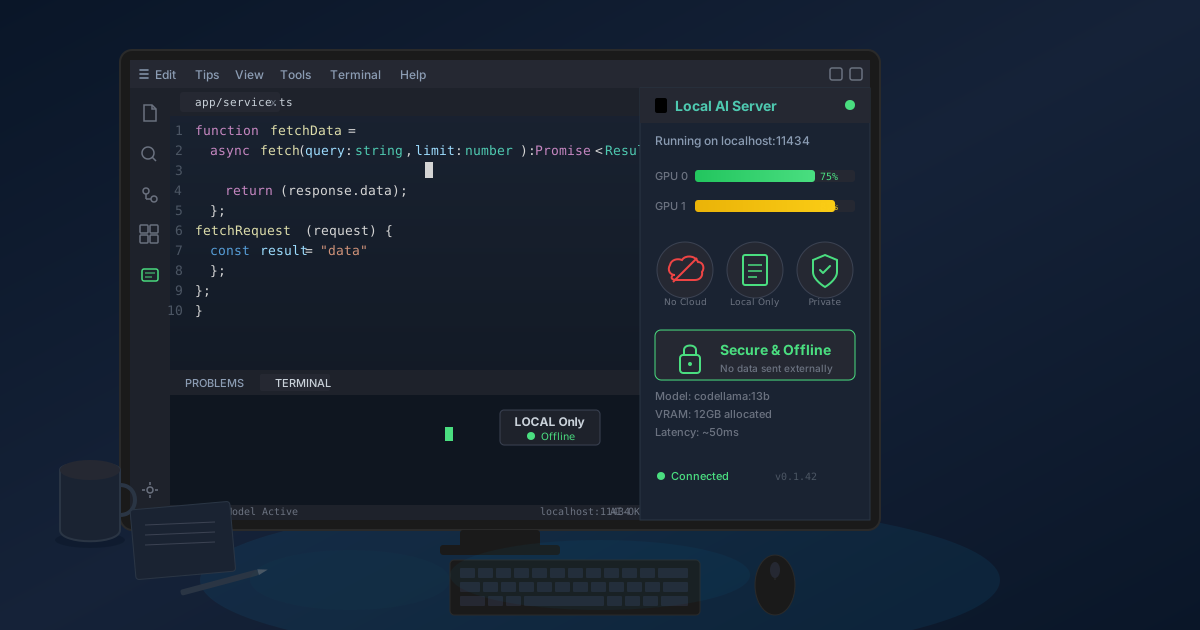
Your code never transmits over the network: When you trigger a completion, Continue.dev reads your local file content, sends it to localhost:11434 (your local Ollama instance), Ollama processes it using your locally-stored model, and returns completions—all within your computer. Zero bytes of code leave your machine.
No telemetry or tracking: Neither Ollama nor Continue.dev phone home with usage statistics, code samples, or telemetry by default. You can verify this yourself by monitoring network traffic during use—you'll see zero connections to AI-related services.
Model weights are yours: The DeepSeek Coder model you downloaded lives in your storage (typically ~/.ollama/models on Linux/Mac or %USERPROFILE%.ollama\models on Windows). It's your copy, stored on your hardware. Nobody can revoke access or change licensing terms retroactively.
No subscription leverage: You're not dependent on maintaining a subscription to keep using the tool. There's no scenario where GitHub or anyone else changes pricing or terms and suddenly you lose access to AI assistance mid-project.
What This Enables
I can work on:
- Proprietary client code under NDA without worrying about cloud AI violating confidentiality
- Code that processes sensitive data without exposing data structures or logic patterns
- Security-sensitive features where AI assistance is valuable but exposure is unacceptable
- Pre-announcement features for clients in stealth mode
- Government or defense adjacent work on air-gapped networks
For the fraud detection client I mentioned at the start, their algorithm implementation now lives exclusively on approved hardware. The AI that helps me write it lives on that same hardware. The completions it generates never touched the internet. We achieved productivity benefits without compromising the intellectual property that represents their core competitive advantage.
This is the privacy value proposition: you keep AI productivity gains without making privacy/security tradeoffs that could genuinely hurt you or your clients.
How Can You Improve Your Local AI Coding Setup?
Once basic local AI works, several improvements enhance the experience further.
Fine-Tuning for Your Codebase
The default models work well for general programming, but you can improve relevance by fine-tuning on your specific codebase. I did this for a large legacy application my client maintains:
Took their codebase (350,000 lines of Python), used it to fine-tune a LoRA adapter for DeepSeek Coder, merged the adapter back. The result was AI that understood their internal frameworks, conventions, and patterns. Suggestions felt noticeably more "in style" with their existing code.
This requires technical knowledge and GPU time (I used a rented GPU instance for 6 hours), but for large projects with significant custom code, it's worth the investment.
Running Multiple Models for Different Tasks
I keep three models available:
DeepSeek Coder 6.7B: My default for fast completions during active coding DeepSeek Coder 16B: Better for complex refactoring or when I need higher-quality suggestions for tricky code Code Llama 13B: Backup option when DeepSeek's suggestions feel off for specific languages
Ollama makes switching trivial—just change the model name in Continue.dev's config. I toggle between them based on what I'm working on and how much I'm willing to wait for higher-quality completions.
Local AI Chat for Code Review
Beyond IDE integration, I run a local instance of ollama with DeepSeek for code review. I pipe git diffs to it and ask for review feedback:
git diff main feature-branch | ollama run deepseek-coder:16b "Review this code change"
The output isn't as nuanced as human review, but it catches obvious issues—missing error handling, inconsistent naming, potential bugs. It's like having a junior developer do first-pass review before involving senior engineers.
How Does Local AI Compare to GitHub Copilot After Six Months?
I've now used exclusively local AI for six months across three client projects and personal work. Here's what actually happened:
Productivity: Roughly equivalent to my Copilot experience. Some tasks are slightly slower (completions take 1-2 seconds versus near-instant), some are faster (zero downtime when cloud services have issues, which happened twice). Overall impact on productivity: neutral to slightly positive.
Cost: Zero ongoing fees. I saved $120 (personal Copilot subscription) plus $380 per client (enterprise Copilot) over six months. Savings: ~$1,500 for six months.
Privacy: Complete confidence working with proprietary code. No anxiety about NDAs, no concern about exposing pre-launch features. Peace of mind: priceless (but legitimately valuable).
Offline capability: Worked on flight from SF to Tokyo with zero interruption. Maintained full productivity during a coffee shop internet outage. Worked at client site with air-gapped development environment. This benefit alone justified the setup for me.
Learning curve: First day was slower (new tool, unfamiliar interface). By day three I was back to normal productivity. By week two I'd customized enough that I prefer this workflow to Copilot.
The honest assessment: Local AI isn't objectively better than Copilot for everyone. If privacy doesn't matter to you, Copilot offers marginally better plug-and-play experience. But if privacy, control, or offline capability matter—which they do for many professional contexts—local AI delivers equivalent productivity without the compromises.
How Do You Set Up Local AI for Development Teams?
Individual local AI works great, but teams can achieve even better results with a shared approach.
The Shared Server Model
Instead of every developer running models on their laptop, deploy one powerful server that the team shares:
Hardware: One machine with serious GPU (RTX 4090, A6000, or similar) serves 5-15 developers comfortably.
Setup: Install Ollama on the server, load your models, configure it to accept connections from your internal network (not the internet), give developers the server address to configure in their IDE extensions.
Benefits:
- Developers with weak hardware get fast completions
- Consistent model versions across team
- Easier to fine-tune once and share
- Centralized management and updates
A consulting firm client implemented this approach. They put an RTX A6000 (48GB VRAM) in a server, loaded DeepSeek Coder 33B, gave all 12 developers access. Each developer configured Continue.dev to point at the shared server instead of localhost. Everyone gets completions from the largest, highest-quality model without needing local GPU.
Cost: $6,000 server plus A6000 GPU. Amortized over 12 developers over 2 years: $250 per developer per year. Compare to $1,140 per developer per year for Copilot Enterprise. ROI is immediate and the privacy benefits are massive.
Frequently Asked Questions About Private AI Coding Assistants
Is a local AI coding assistant as good as GitHub Copilot?
For most practical coding tasks, local models like DeepSeek Coder 6.7B provide comparable quality to Copilot. After six months of exclusive local AI use, productivity was roughly equivalent. Some tasks took 1-2 seconds longer for completions, but offline capability and zero downtime during cloud outages compensated for this difference.
How much does it cost to run a private AI coding assistant?
Zero ongoing costs. The setup requires a one-time investment of about an hour. Hardware you already own is typically sufficient. Electricity costs for running local AI are approximately $5-10 per month for heavy use. Compare this to $10-20 monthly for Copilot or $19-39 for Copilot Enterprise per user.
Can I use a local AI coding assistant offline?
Yes. Once you download the model files (typically 4-8GB for code models), everything runs entirely on your hardware without any internet connection. This enables working on planes, in secure facilities, or in areas with poor connectivity.
Which IDE extensions work with local AI coding assistants?
Continue.dev for VS Code is the most popular option and supports Ollama directly. JetBrains IDEs support Continue.dev as well. Neovim users can use plugins like cmp-ai or gen.nvim. All of these connect to your local Ollama instance using the same API endpoint.
How fast are code completions with local AI?
With an RTX 4070 and DeepSeek Coder 6.7B, completions appear within 0.5-1.5 seconds. With an RTX 3060, expect 1-2 seconds. On an M1 MacBook Air, completions take 2-3 seconds. These speeds are slower than cloud Copilot but fast enough for productive coding without frustration.
Can I fine-tune a local coding model on my codebase?
Yes. You can create LoRA adapters fine-tuned on your specific codebase, conventions, and patterns. This requires GPU time (about 6 hours on a rented instance) but results in significantly more relevant suggestions for large projects with custom frameworks.
Does local AI work with all programming languages?
DeepSeek Coder and Code Llama support all major programming languages including JavaScript, TypeScript, Python, Go, Rust, Java, C++, and more. Quality is highest for popular languages with more training data. Specialized or niche languages may have slightly lower quality.
The Bottom Line
Local AI for coding is not only viable now but will become dominant for specific use cases within the next two years. Model quality improves monthly. Hardware gets cheaper and more capable. Tools become more user-friendly. The gap between local and cloud AI quality narrows while the privacy and control advantages of local AI remain constant.
For developers and teams where code privacy matters, local AI is a legitimate choice that balances productivity, privacy, and control in ways cloud services simply cannot.
Your code is your competitive advantage, your client deliverable, your intellectual property. Keeping it on hardware you control while still benefiting from AI assistance is professional best practice.
Ready to take control of your development workflow? Download Ollama, pull DeepSeek Coder, configure Continue.dev, and experience AI coding assistance that respects your privacy. The setup takes an hour. The peace of mind lasts your entire career.
When you are working with files and documents outside of code, the same privacy-first philosophy applies. Our browser-based conversion tools process your files locally just like your AI processes code locally. Whether you are converting PDFs to Word, compressing files, or working with any document format, local processing ensures your data stays yours.
Or explore our local AI chat interface powered by Ollama, the same technology we just set up for coding, available for general-purpose AI assistance without sending your queries to the cloud.
Private AI is available today. Start using it.